
Is your dropshipping business ready to launch? Get started building your dropshipping website with the ELEX WooCommerce Multi Vendor Plugin. This is the ideal solution for WooCommerce dropship websites that require no inventory maintenance.
Dropshipping has become one of the most popular business models in the fast-paced world of e-commerce due to its lower startup costs and flexibility. The dropshipping approach allows entrepreneurs to distribute products without maintaining inventory, relying on suppliers to send them directly to customers. In turn, this reduces overhead and expands the product line.
The ELEX WooCommerce Multi Vendor Plugin is a powerful tool that transforms a standard WooCommerce store into a multi vendor marketplace, making it an ideal choice for building a dropshipping website. This article will walk you through the process of creating a successful dropshipping website using this ELEX plugin.
Understanding Dropshipping
The first step in creating a multi-vendor dropshipping website is understanding the difference between a dropshipping store and a multi-vendor website.
What is Dropshipping?
Dropshipping is an e-commerce model that allows you to sell products without holding inventory. Instead of stocking items, you partner with third-party suppliers who handle storage and shipping. The supplier ships the product directly to the customer after a customer places an order on your website. This means you don’t manage inventory or deal with shipping, simplifying your business operations.
Prices are set by you, along with a profit margin. Dropshipping is easy to start and allows you to offer a wide range of products quickly. It’s an ideal choice for those wanting to run an online store without the hassles of inventory management and shipping logistics.
What is the Multi Vendor website?
The Multi Vendor website is a platform that allows multiple sellers to list and sell their products simultaneously. Unlike a traditional eCommerce store run by a single entity, a Multi Vendor site allows various independent sellers to create their own stores within the marketplace. Each vendor manages their own inventory, product listings, and orders, while the marketplace owner handles the overall platform, including user experience, payment processing, and site maintenance.
This model offers a diverse product range and fosters competition among vendors, potentially leading to better prices and more options for customers. Multi-vendor websites can scale easily, attracting various sellers and expanding product offerings without the need for a large upfront investment in inventory. Examples include Amazon, eBay, and Etsy.
Why Choose Dropshipping?
Some of the benefits of dropshipping include:
Low Startup Costs
- You don’t need to purchase inventory upfront, reducing financial risk.
- No costs associated with warehousing or managing stock.
Flexibility
- With an internet connection, your business can be operated from anywhere.
- Easily test new products or niches without significant investment.
Wide Product Range
- Access to a broad selection of products since you’re not limited by storage space.
- Quickly add new products or adjust inventory based on market trends.
Scalability
- Scale your business by partnering with more suppliers and expanding product lines.
- Automate processes and manage multiple vendors through a centralized platform.
Focus on Marketing
- Spend more time on marketing strategies to attract and retain customers.
- Develop a strong brand identity and customer loyalty without the distraction of inventory management.
How does a Dropshipping website function?
A dropshipping website operates as a marketplace where multiple sellers list their products, while the platform owner manages the overall site. Here’s how it functions:
- Vendor Onboarding: Sellers apply to join the platform, and once approved, they can create their own storefronts. Each vendor manages their product listings, pricing, and inventory through their dashboard.
- Product Listings: Vendors upload their products, including descriptions, images, and prices. These products are visible to customers browsing the marketplace.
- Order Placement: When a customer places an order, the platform notifies the respective vendor. The vendor then processes the order and sends it directly to the customer, handling shipping and delivery.
- Payment Processing: The platform owner handles payment processing, collecting money from customers and disbursing funds to vendors after deducting any fees or commissions.
- Customer Service: The marketplace owner manages site-wide customer service, but vendors address inquiries related to their specific products.
- Platform Management: The site owner ensures the marketplace operates smoothly, including site maintenance, marketing, and handling disputes between vendors and customers.
What Is a WooCommerce Dropshipping Marketplace?
A WooCommerce dropshipping marketplace combines two ecommerce models: dropshipping and multi-vendor selling.
In a traditional dropshipping store, the store owner lists products, accepts customer orders, and works with suppliers to fulfill them. In a multi-vendor marketplace, multiple independent sellers operate through one website.
Combine the two and the structure becomes:
Customer → Marketplace → Vendor → Supplier → Customer
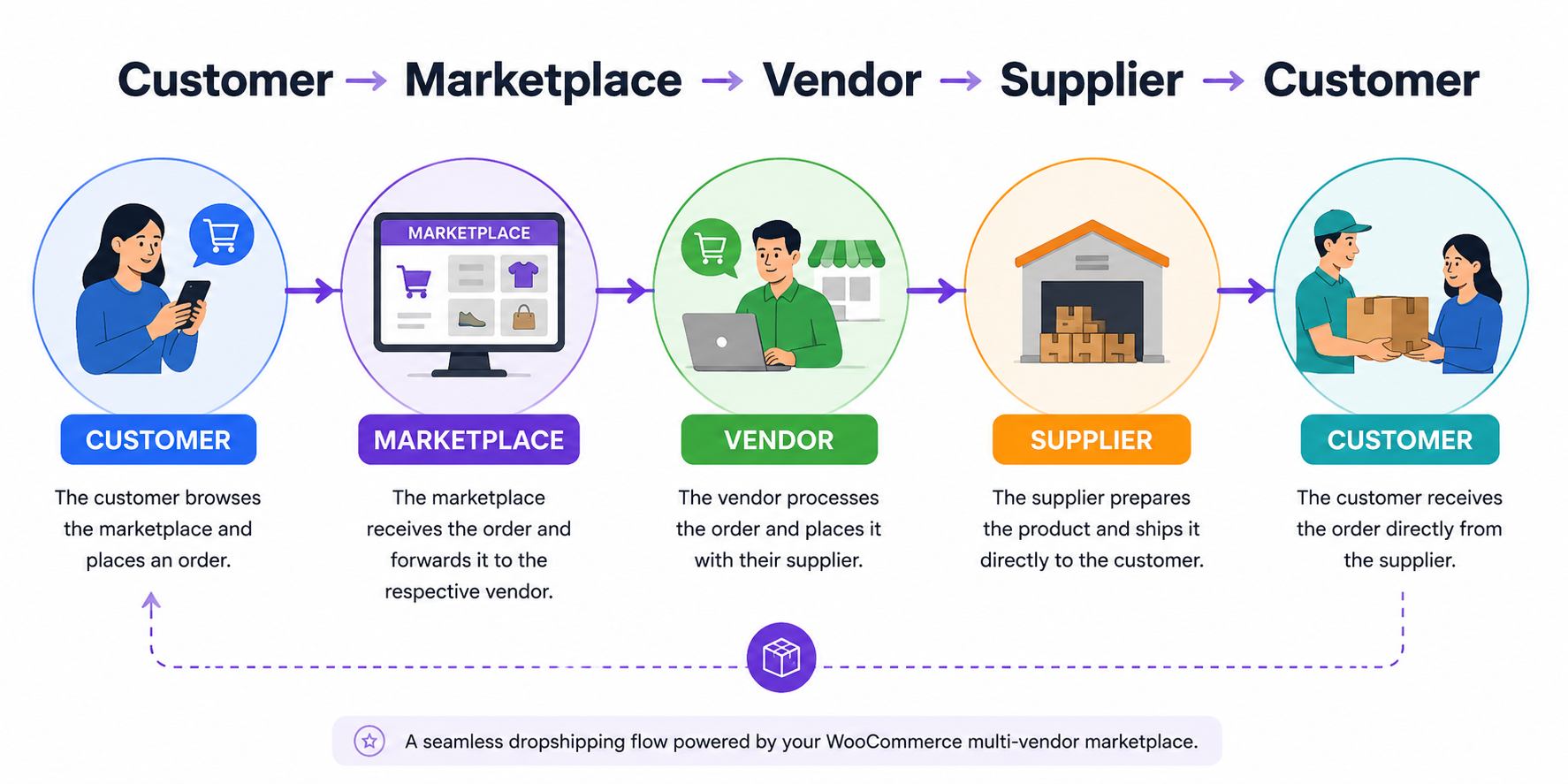
The marketplace owner provides the platform. Vendors can manage their products and orders, while their suppliers handle fulfillment according to the vendor’s dropshipping model.
The difference matters because a marketplace now has to manage more than products and customers. It also needs vendor registration, product approval, vendor permissions, commissions, settlements, shipping, and storefront management.
For example, ELEX allows vendors to manage products and orders from a frontend dashboard while giving administrators control over vendor access, product approval, commissions, settlements, and store visibility.
Why Do You Need a Multi-Vendor Plugin for WooCommerce Dropshipping?
WooCommerce can handle the core e-commerce functions of a store, but a multi-vendor dropshipping marketplace requires an additional management layer.
Your marketplace may need to handle multiple processes at once. This includes:
- Register and approve vendors
- Give vendors their own dashboards
- Allow vendors to add and manage products
- Control which products are published
- Manage vendor orders
- Calculate marketplace commissions
- Track vendor settlements
- Give vendors appropriate shipping controls
- Display vendor information on product and store pages
The ELEX WooCommerce Multi Vendor Marketplace Plugin brings these capabilities into WooCommerce. Its onboarding wizard supports vendor registration and approval, while its vendor dashboard provides access to products, orders, coupons, shipping, payments, settings, and marketplace analytics.
This is especially useful for dropshipping because the marketplace owner does not have to manually manage every vendor’s catalog and order activity.
Setting Up WooCommerce for a Dropshipping Website
Installing WordPress and WooCommerce
- Install WordPress
Choose a reliable hosting provider and set up WordPress. - Install WooCommerce
Go to the WordPress dashboard, click Plugins, then “Add New,” and search for WooCommerce. Activate the plugin once it has been installed. - Selecting a Suitable Theme
Choose a responsive WooCommerce-compatible theme that suits your brand. Popular options include Astra, OceanWP, and Storefront.
Configuring WooCommerce Settings
- General Settings
Choose a store location, currency, and selling location. - Payment Gateways
Configure payment methods like PayPal, Stripe, or others relevant to your target market. - Shipping Options
Define shipping zones, methods, and rates to align with your dropshipping suppliers.
Employing ELEX WooCommerce Multi Vendor Plugin
You can unbolt your WooCommerce store entirely with the help of the ELEX WooCommerce Multi Vendor Plugin. You can streamline your vendor management process with its integrated configurations to create an ideal marketplace. Your multi vendor marketplaces will be more usable and secure with the ELEX Multi Vendor Plugin, which manages everything from vendor onboarding to commissions and settlement procedures.
The ELEX WooCommerce Multi Vendor Plugin is an essential tool for establishing and managing a dropshipping website. Employing the ELEX WooCommerce Multi Vendor Plugin helps you configure and manage a dropshipping website effectively, providing a streamlined solution for running a multi-vendor marketplace without the complexities of inventory management.

Highlighted Features
- You can enable or disable vendor access to the vendor dashboard.
- Easy addition, updating, and management of products and categories at your fingertips.
- Manage orders easily from the vendor dashboard with quick overviews.
- Build customer engagement and sales with built-in coupon functionality.
- By managing their shipping details efficiently, vendors ensure fast and accurate deliveries.
Creating a Dropshipping Website
Installation
- Download the Plugin: Visit the ELEX plugin page.

- Install the Plugin: From the WordPress dashboard, go to Plugins > Add New > Upload Plugin, select the downloaded file, and click “Install Now.”
- Activate the Plugin: Once installed, click “Activate” to start using the plugin.

Initial Configuration
- Vendor Profiles: Configure settings for vendor registration and approval processes.
- Vendor Dashboards: Customize dashboards to offer vendors essential tools for managing their products and orders.


Creating Vendor Accounts
- Vendor Registration: Enable vendor registration through a dedicated signup page.
- Admin Approval: Set up a process for reviewing and approving new vendor applications.
Vendor Dashboard Features
-
- Product Management: Vendors can add, edit, and manage their product listings.
- Sales Reports: Access to sales data and analytics to track performance.
- Order Management: Vendors can manage orders, track shipments, and handle customer inquiries.
 Adding Products

- Product Listing Guidelines: Ensure vendors adhere to consistent listing practices, including high-quality images and detailed descriptions.
- Categories and Tags: Organize products using categories to improve navigation.

Managing Inventory and Pricing
- Automated Stock Updates: Use plugins or integrations to sync inventory levels with suppliers.
- Competitive Pricing Strategies: Encourage vendors to research and set competitive prices while considering shipping costs and fees.

Order Management System
- Order Tracking: Implement a system for tracking orders from purchase to delivery.
- Automated Notifications: Set up email notifications to keep vendors and customers informed about order status.

Integrating Shipping
Enable vendors to configure their own shipping methods and rates. Vendors can manage shipping settings from their dashboards. You can select whether shipping options should be enabled or disabled. Furthermore, you can view additional details such as tax status, zone name, and region.
Real-Time Scenarios for Setting Up a Dropshipping Website
For instance, you’re creating a dropshipping website with three vendors: Vendor 1 from New York, Vendor 2 from Florida, and Vendor 3 from Los Angeles. Each vendor specializes in selling vinyl flooring. Take a look at how Vendor 1 is assigned. In similar ways, you can create other Vendor profiles too.
Step 1: Setting Up Vendor Profiles
- Vendor 1 (New York)
- Create a profile for Vendor 1 using the WooCommerce Multi-Vendor Plugin.

- Assign roles such as product management and order processing.
- Enable Vendor 1 to add products, manage inventory, and track sales.

- Create a profile for Vendor 1 using the WooCommerce Multi-Vendor Plugin.


Example: Vendor 1 uploads a variety of flooring options with descriptions, prices, and images.
Step 2: Displaying Vendors
- On the plugin’s dashboard, you can click on the Manage Vendor Dashboard, which will show you all the vendors listed for your store.

- This page displays all vendors and allows customers to explore each vendor’s products.

Example: A customer clicks on Vendor 1’s name and sees a curated list of all their flooring products.
Step 3: Managing the Dropshipping Model
- As the dropshipper, you control the main store, set profit margins, and manage product listings.

- Vendors focus on maintaining inventory and handling shipping logistics.

Step 4: Handling Shipping and Real-Time Rates
- Integrate a shipping carrier API to provide real-time shipping rates based on customer location.
- Ensure shipping costs are calculated accurately and displayed during checkout.
Example: A customer from Chicago selects a product from Vendor 1. The plugin fetches real-time shipping rates from New York to Chicago and displays options such as standard or expedited shipping.
Thus, by leveraging the ELEX WooCommerce Multi Vendor Plugin, you can efficiently manage a dropshipping website.
Use Case: Creating a Dropshipping Website with ELEX WooCommerce Multi Vendor Support Plugin
- Automated Inventory Management
If a vendor adds new products, the ELEX WooCommerce Multi Vendor Support for ELEX Shipping Plugins automatically syncs product listings with your website. This streamlines updates, ensuring accurate inventory without manual intervention. - Seamless Order Fulfillment
If a customer places an order, this plugin coordinates with ELEX shipping plugins to auto-select the best shipping options. This ensures timely deliveries, improving customer satisfaction with positive user experience metrics. - Vendor Performance Analytics
The plugin provides detailed analytics on vendor performance, helping identify top sellers. Promoting these vendors enhances site credibility, attracts more traffic, and improves customer engagement.
Consequently, by using the ELEX WooCommerce Multi Vendor Plugin and shipping integrations, you streamline dropshipping operations, ensuring efficient vendor management, accurate shipping calculations, and a seamless shopping experience for customers. This setup allows you to focus on business growth while vendors handle their inventory and shipping logistics.
Best Practices for Running a WooCommerce Dropshipping Marketplace
The technology is only part of building a successful marketplace. Your operating rules matter too.
Verify Vendors Before Approval
Review vendor information and define clear marketplace requirements before allowing sellers to go live.
Keep Product Approval Controls On
If product quality matters to your marketplace, review products before publication rather than allowing everything to appear immediately.
Define Commission and Settlement Rules Early
Vendors should know how much commission the marketplace takes, who handles shipping charges, and when settlements are processed.
Make Shipping Transparent
Different vendors can have different shipping locations and delivery timelines. Make those rules clear at checkout.
Keep Product and Inventory Information Accurate
Dropshipping depends heavily on accurate supplier information. Out-of-stock products or outdated pricing can quickly create customer service problems.
Optimize Vendor and Product Pages
A marketplace has two SEO opportunities: the product catalog and the individual vendor storefronts. ELEX can display vendor details on store and product pages and allows administrators to configure vendor store URL slugs.
Why Use ELEX for a WooCommerce Dropshipping Marketplace?
The value of a multi-vendor plugin is not simply the number of features it contains. It is how those features connect to the way a marketplace actually operates.
With ELEX, you can handle the main stages of the workflow from within WooCommerce:
For businesses planning a WooCommerce dropshipping marketplace, that means the plugin becomes part of the actual operating system of the marketplace rather than simply another WooCommerce extension.
And when shipping is a major concern, the ELEX Multi-Vendor Support Add-On can extend the setup with vendor-specific real-time shipping rates, consolidated rates, and shipping-label generation.
Conclusion
Creating a WooCommerce dropshipping marketplace involves more than adding products to a WooCommerce store. You need a system for managing vendors, products, orders, commissions, settlements, and shipping while keeping the customer experience simple. All of these can be achieved with a single plugin from ELExtensions!
The ELEX WooCommerce Multi Vendor Marketplace Plugin provides that marketplace layer. It gives administrators centralized control while allowing vendors to manage their own products, orders, storefronts, and financial information. This ensures that stores are able to focus on selling, while you can focus on managing your marketplace.
At the same time, this setup can also handle vendor-specific or consolidated real-time shipping rates and shipping labels. It’s an important part of running a dropshipping marketplace with products coming from multiple sellers.
FAQ’S
- How do I onboard vendors to my dropshipping site?
Vendors can apply to join your marketplace through a registration process. Once approved, they can set up their profiles, manage their product listings, and access their own vendor dashboards to handle orders and inventory. - What are the steps for setting up product listings?
Vendors add and manage their own product listings through their dashboards. They can upload product images, write descriptions, and set prices. Ensure that your site has clear guidelines for vendors to follow for consistency. - How does order processing work with this plugin?
When a customer places an order, the plugin automatically notifies the relevant vendor. The vendor then handles the order fulfillment, including packing and shipping the product directly to the customer. This process is streamlined to reduce manual intervention. - How does payment handling function?
The plugin integrates with various payment gateways to securely process transactions. It manages the financial aspects by splitting payments between the marketplace owner and vendors, deducting any applicable fees or commissions before transferring funds to vendors. - How do I configure shipping and tax settings?
You can choose shipping methods, rates, and zones according to the capabilities of your vendors and the preferences of your customers. Tax settings can be adjusted to comply with regional requirements, ensuring accurate tax calculations for each transaction.