Offering FedEx shipping through WooCommerce should be straightforward. But at the same time, getting accurate shipping rates at checkout, printing labels, and keeping customers updated with tracking information can quickly become complicated. Manually calculating shipping costs and switching between different platforms can slow down order fulfillment and create unnecessary errors.
A WooCommerce FedEx shipping integration can help streamline this process by connecting your store with FedEx services. You can display live shipping rates, select suitable delivery options, generate shipping labels, and manage shipment tracking through a connected workflow.
In this guide, we’ll explain how to set up FedEx shipping in WooCommerce, configure live rates, choose shipping services, manage packaging, print labels, and troubleshoot common issues.
FedEx Shipping

FedEx Shipping is one of the simplest and most affordable [ Compare the Shipping Cost & Estimated Delivery Date from Leading Shipping Carriers ] shipping carriers you can choose from to avail hassle-free shipping for your business. FedEx offers umpteen number of options to ship the packages without any disruptions too, which makes the services much appealing. FedEx lets you ship domestic or international, inbound or outbound in the simplest manner.
Why FedEx?
When you consider importing or exporting, FedEx has varied choices for every kind of service to offer. Here are a few popular reasons that make FedEx an ideal choice for you :
A wider range of Choices offered in shipping: Importing and exporting to more than 220 countries as well as other territories worldwide is one of the prime reasons for choosing FedEx.The wide range of shipping services offered by FedEx is ideal for any retailer.
Simplicity: FedEx offers a wider range of shipping tools that make shipping and tracking easy and hassle-free.Also, tools to run detailed reports that give a detailed view of taxes and duties are listed.
Live Support – FedEx has a commendable support system to assist anyone in need. With shipping to more than 220 countries, they have excellent and supportive support centers to assist their clients.
Tension-free customs clearance: With International shipping comes customs clearance. With FedEx, enjoy tension-free customs clearance and ship across international locations.
Better Savings: The cost for overall shipping to all locations is comparatively lower. Moreover, FedEx has several shipping boxes that are free as well as affordable.
The reassurance of service: Once your package is shipped, we ensure that you receive the invoice for the same.
Money-Back Guarantee: If you are worried about delivery time or other issues, then FedEx offers a money-back guarantee on their orders.
Shipping Services
FedEx has mainly a few major shipping services meant for supporting businesses. FedEx supports both non-freight and normal shipping for businesses.
These are the basic shipping services offered by FedEx
| Domestic services offered by FedEx | International services offered by FedEx |
| FedEx SameDay | FedEx International Next Flight |
| FedEx First Overnight | FedEx International First |
| FedEx Priority Overnight | FedEx International Priority |
| FedEx Standard Overnight | FedEx International Economy |
| FedEx 2Day AM | FedEx International MailService |
| FedEx 2Day | FedEx International Priority Direct Distribution |
| FedEx Express Saver | FedEx International Economy Direct Distribution |
In case your business is mainly dealing with freight shipments, then these are the services taken care of by FedEx
| FedEx Freight Domestic services | FedEx Freight International services |
| FedEx SameDay Freight | FedEx International Next Flight |
| FedEx First Overnight Freight | FedEx International Priority Freight |
| FedEx 1Day Freight | FedEx International Economy Freight |
| FedEx 2Day Freight | FedEx International Premium |
| FedEx 3Day Freight | FedEx International Airport-to-Airport |
| FedEx Charters | FedEx Charters |
| – | FedEx International Priority Direct Distribution Freight |
| – | FedEx International Economy Direct Distribution Freight |
| – | FedEx International Priority Direct Distribution Air Solutions |
FedEx Packaging options
Here are various packaging options by FedEx :
Envelops

FedEx offers envelopes in various sizes to send shipments weighing less than .08oz.
- FedEx Envelope (pouch) –
- FedEx Envelope (no pouch)-Used with peel-and-stick airbills.
- FedEx Envelope (window) – (special envelope)
Dimension – 9-1/2″ x 12-1/2″
Weight – 1.5 oz (when empty)
- Legal Size Reusable FedEx Envelope
Dimensions: 9-1/2″ x 15-1/2″ and Weight when empty: 2 oz. Mostly suited for shipments less than 8 oz. The envelope is reusable.
FedEx Boxes
To ship using FedEx, they provide some basic boxes and envelopes to ship.
FedEx Small Box (S1: rectangular and shallow in shape)
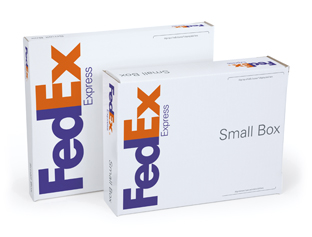
- Inside dimensions – 10-7/8″ x 1-1/2″ x 12-3/8″
- Weight when empty is 4.5 oz.
- The contents should be equal to 20 lbs. or lesser as well as compatible with the container and packed securely.
- Meant for packing documents, file folders, DVDs, CDs, video games, and soft goods.
FedEx Small Box (S2: rectangular and deep in shape)
- Inside dimensions- 8-3/4″ x 2-11/16″ x 11-5/16″
- Weight when empty should be 4.5 oz.
- Additional quantity limits apply to this box if you are shipping with FedEx standard rates.
- The contents should be equal to 20 lbs. or less and compatible with the container and packed securely.
- Meant for documents, books, small parts, DVDs, CDs, video games, and soft goods that require extra width.
FedEx Medium Box (M1: rectangular and shallow in shape)
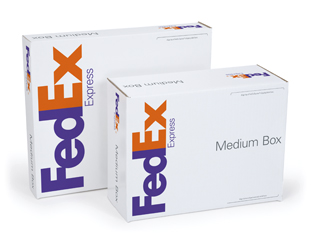
- Inside dimensions- 11-1/2″ x 2-3/8″ x 13-1/4″
- Weight when empty is 6.5 oz.
- The contents are equal to 20 lbs. or less, compatible with the container, and are packed securely.
- Meant for documents, binders, books, small parts, DVDs, CDs, video games, and soft goods.
FedEx Medium Box (M2: rectangular and deep in shape)
- Inside dimension – 8-3/4″ x 4-3/8″ x 11-5/16″
- Weight when empty – 6.5 oz.
- Additional quantity limits apply to this box if you are shipping with FedEx standard rates.
- The contents must be 20 lbs. or less and compatible with the container. It should be packed securely.
- Meant for documents, books, small parts, DVDs, CDs, video games, and soft goods that require extra depth.
FedEx Large Box (L1: rectangular and shallow in shape)

Inside dimensions- 12-3/8″ x 3″ x 17-1/2″
Weight when it is empty: 14.5 oz.
The contents must be 30 lbs. or less, compatible with the container, and packed securely.
Meant for side-by-side paper stacks, small parts, soft goods, and oversized binders,
FedEx Large Box (L2: square and deep in shape)
Inside dimensions- 8-3/4″ x 7-3/4″ x 11-5/16″
Weight when empty: 9.4 oz.
If you are shipping with FedEx standard rates, additional quantity limits apply to this box.
The contents must be equivalent to 30 lbs. or less, compatible with the container, and packed securely.
Intended for housewares, small parts, sports accessories, and toys,
FedEx Extra Large Box (X1: cube-shaped)

Inside dimensions- 11-7/8″ x 10-13/16″ x 11-1/16″
Weight when empty is 20 oz.
If you are shipping with FedEx standard rates, then additional quantity limits apply to this box.
The contents should be 50 lbs. or less, and compatible with the container and packed securely.
Intended for handbags, books, sporting goods, binders, housewares, and other circular or cube-shaped items to ship.
FedEx Extra Large Box (X2: rectangular-shaped)
Inside dimensions- 15-3/4″ x 14-3/16″ x 6″
Weight when empty is 30 oz.
Additional quantity limits apply to this box when you are shipping with FedEx standard rates.
The contents should weigh 50 lbs. or less, and compatible with the container as well as packed securely.
Intended for handbags, binders, cases, trays, soft goods, etc.
FedEx Tube

- Inside dimensions- 6″ x 6″ x 38″
- For dimensional weight calculation- 5″ x 6″ x 38″
- Weight when empty is 16 oz.
- The contents must be 20 lbs. or less, compatible with the container, and packed securely.
Here are some cost-effective boxes for international shipping :
FedEx 10kg Box and FedEx 25kg Box
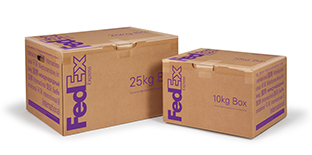
This is a double-walled box for shipping to more than 220 countries across the globe using FedEx International Priority.
FedEx 10kg Box
Inside dimensions- 15-13/16″ x 12-15/16″ x 10-3/16″
Weight when empty- 31 oz.
The contents should be 22 lbs or less, compatible with the container, and packed securely to suit the need.
FedEx 25kg Box
Inside dimensions- 21-9/16″ x 16-9/16″ x 13-3/16″
Weight when empty: 57 oz.
The contents should be 56 lbs. (25 kg) or less.
How to pack FedEx packages with extra protection?
FedEx helps to ship certain packages with extra protection.
FedEx Box With Safe Insert
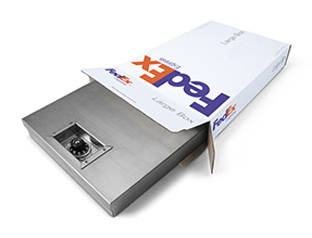
Strengthened aluminum box in two sizes that can fit securely inside the FedEx Medium Box (M1) and the FedEx Large Box (L1). The box is equipped with a combination lock or key lock, which is accessed only by the shipper and recipient. It also provides added safety, strength, and security for high-value items.
Inside dimensions (medium)- 11-1/2″ x 2-3/8″ x 13-1/4″
Weight when empty (medium)- 4.2 lbs
Inside dimensions (large)- 12-3/8″ x 3″ x 17-1/2″
Weight when empty (large) – 5.3 lbs. (including FedEx Large Box)
How to ship temperature-sensitive items using FedEx?
Shipping temperature-sensitive items is a crucial part of shipping. Hence, it is important to ship them properly without causing much damage to the package. At FedEx, you can use the Cold Shipping Package provided by FedEx.
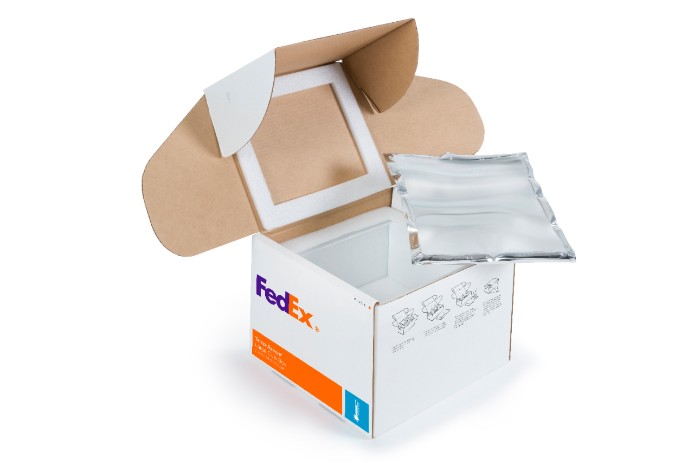
The package can easily maintain the temperature for a consistent period. Moreover, it is beneficial in keeping sensitive healthcare shipments cold.
Shipping Clinical Paks and Boxes for Non-infectious items
Here are certain boxes to ship non-infectious items :
FedEx Small Clinical Pak and FedEx Large Clinical Pak
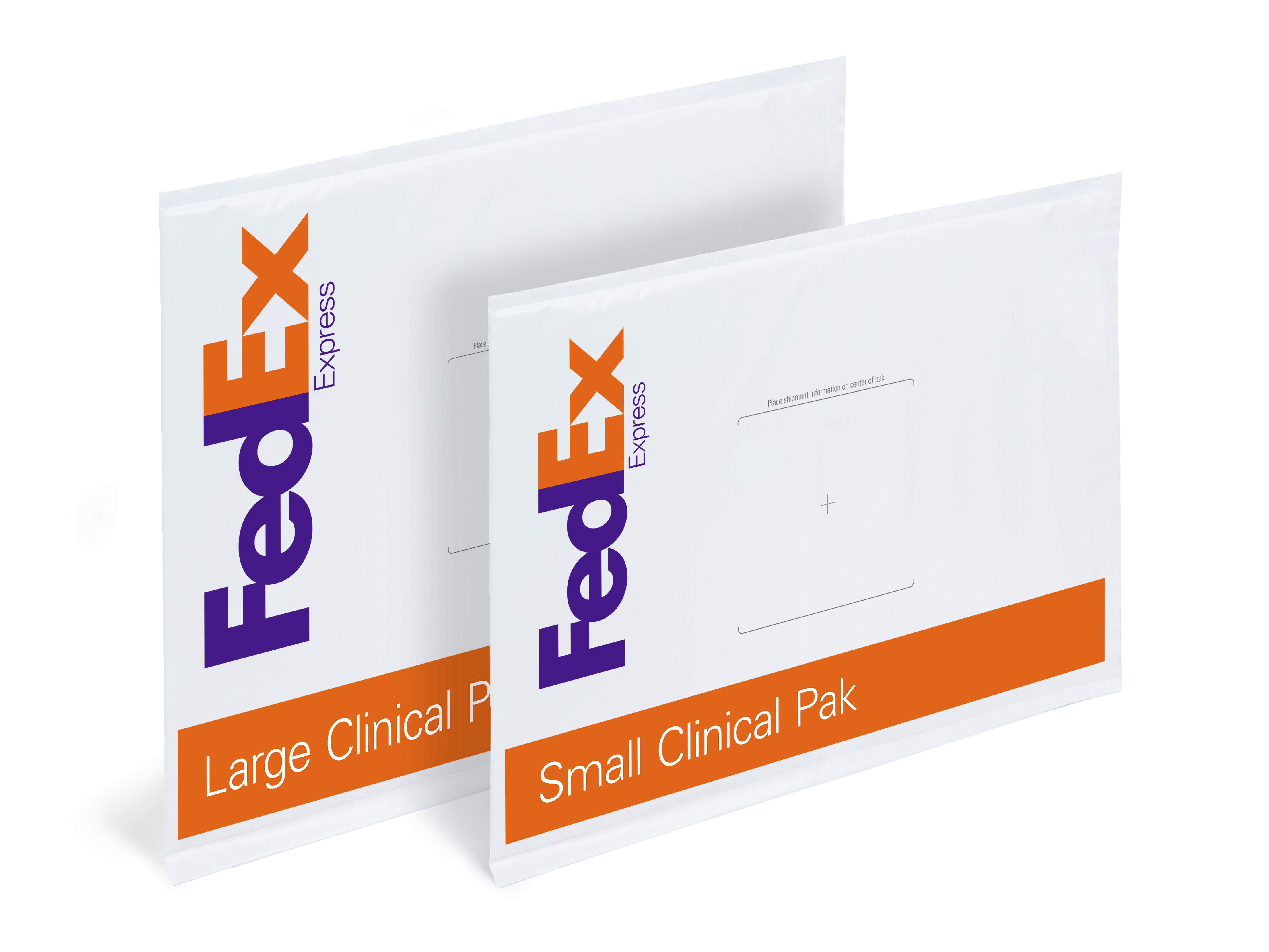
You can use these wraps to cover the non-infectious items after they are inserted into the inner sturdy container.
FedEx Small Clinical Pak
Inside dimensions: 9-1/2″ x 13″
Weight when empty: 0.8 oz.
FedEx Large Clinical Pak
Inside dimensions:-13-1/2″ x 18″
Weight when empty: 1.2 oz.
FedEx Shipping Services and Delivery Times
FedEx offers several domestic and international shipping services. Choosing the right option depends on how quickly an order needs to arrive, where it is going, the shipment details, and which services are available through your account.
The following table provides a general reference to selected FedEx services, primarily for U.S.-origin shipments.
| FedEx service | General delivery window | Best suited for |
|---|---|---|
| FedEx First Overnight | Next-business-day morning delivery in eligible areas | Urgent shipments requiring early delivery |
| FedEx Priority Overnight | Next-business-day delivery, with commitments varying by destination | Time-sensitive domestic shipments |
| FedEx Standard Overnight | Next-business-day afternoon or evening delivery, depending on destination | Domestic shipments requiring next-day delivery |
| FedEx 2Day A.M. | Delivery in two business days, with morning delivery commitments in eligible areas | Shipments requiring earlier two-day delivery |
| FedEx 2Day | Delivery in two business days | Time-sensitive shipments that do not require overnight delivery |
| FedEx Express Saver | Generally three business days in eligible areas | Domestic express shipping at a less urgent speed |
| FedEx Ground | Generally 1–5 business days for U.S. business deliveries | Standard business shipments |
| FedEx Home Delivery | Residential delivery, with timing depending on destination | E-commerce orders shipped to homes |
| FedEx International First | Priority international delivery in eligible destinations | Urgent international shipments |
| FedEx International Priority | Expedited international delivery, with transit times varying by route | International orders requiring faster delivery |
| FedEx International Economy | Generally 2–5 business days to many international destinations | International shipments balancing speed and cost |
Make sure to check out FedEx shipping services, FedEx overnight delivery, and FedEx international shipping to understand the current availability of each of these services.
The availability and transit times depend on the origin, destination, package, selected service, and applicable terms. Some services may not be available through every WooCommerce integration. Before displaying a service or delivery estimate at checkout, verify the options returned for your connected account and the specific shipping route.
Benefits of FedEx services when using non-freight shipping
Each non-freight service has different delivery dates and other features. When one service delivers within a day, the other might take much more time. Hence, it is important to understand which service is better. Let us take a look at them :
| Non-Freight Services | Noteworthy Features |
| FedEx SameDay |
|
| FedEx First Overnight |
|
| FedEx Priority Overnight |
|
| FedEx Standard Overnight |
|
| FedEx 2Day AM |
|
| FedEx 2Day |
|
| FedEx Express Saver |
|
| FedEx International Next Flight |
|
| FedEx International First |
|
| FedEx International Priority |
|
| FedEx International Economy |
|
| FedEx International Mail Service |
|
| FedEx International Priority Direct Distribution |
|
| FedEx International Economy Direct Distribution |
|
Freight Shipping Services by FedEx
| Freight Services | Features |
| FedEx SameDay Freight | · Ensures door delivery within hours. Ideal for shipments weighing 151 lbs or more, such as those composed of multiple packages or palletized freight; skids exceeding 2,200 lb |
| FedEx First Overnight Freight |
|
| FedEx 1Day Freight |
|
| FedEx 2Day Freight |
|
| FedEx 3Day Freight |
|
| FedEx Charters |
|
| FedEx International Next Flight |
|
| FedEx International Priority Freight |
|
| FedEx International Economy Freight |
|
| FedEx International Premium |
|
| FedEx International Airport-to-Airport |
|
| FedEx Charters ( Freight) |
· Allowed packages include :
|
| FedEx International Priority Direct Distribution Freight |
|
| FedEx International Economy Direct Distribution Freight |
|
| FedEx International Priority Direct Distribution Air Solutions |
|
Tracking with FedEx
With FedEx tracking, you can easily gain an unparalleled insight into where your shipment is in transit. FedEx tracking is excellent in providing tracking information. It is the simplest gateway to manage your shipping easily.
Here are some of the major features of FedEx tracking :
1. Improved design and layout for viewing the shipment details.Can manage it with ease.
2. Easily customizable options.
3. You can easily share updates about the tracking.
4. Signature proof of delivery.
5. It is easy to provide an option to redirect.
6. It provides seamless visibility for tracking and even to view shipments in the calendar view.
7. Also lets you track all kinds of FedEx Shipping services.
Why use External Shipping Carriers?
WooCommerce does not provide any kind of real-time rates, etc.; hence, when you need to provide real-time shipping rates at checkout, you need to make use of other shipping carriers to provide better shipping options. With live rates, you need not worry about the shipping cost, as it is automatically calculated using the carrier API. With Shipping live rates, the customer gets rates based on the weight, dimensions, as well as shipping addresses and zones specified. ELEX EASY POST plugin is one of the shipping services that helps you to incorporate UPS, FedEx, and USPS shipping onto your WooCommerce store in a quick way. The shipping services allow you to manage all your shipping services on a single platform. Also, it helps to keep tracking information in a single window.
To include FedEx Shipping service on your eCommerce store, you can make use of the EasyPost plugin. Let us see how you can do the same.
How to Set Up WooCommerce FedEx Shipping
The easiest way to integrate FedEx with WooCommerce is to use a compatible shipping plugin. An integration can connect your store to carrier services and help you manage shipping operations without manually calculating every shipment.
You can use ReachShip WooCommerce to help ease your WooCommerce integration with FedEx. ReachShip supports multi-carrier shipping workflows and features such as real-time rates, label generation, shipment tracking, and packaging configuration.
Before you begin, make sure you have:
- An active WooCommerce store with shipping enabled.
- A FedEx account.
- A ReachShip account and the credentials required to connect your store.
- Accurate product weights and dimensions.
- Your shipping-origin address and a test delivery address.
Step 1: Install the ReachShip WooCommerce plugin
You can download the plugin from Elextensions.com.

In your WordPress dashboard:
- Navigate to Plugins and click on Add New Plugin.
- Select Upload Plugin if you have downloaded the plugin ZIP file.
- Upload the file and select Install Now.
- Activate the plugin.
- Open the ReachShip settings from your dashboard.
If you need help, follow the official ReachShip WooCommerce setup guide.
Step 2: Connect your ReachShip account
Sign in to your ReachShip account or create one if you haven’t already.
Locate the API credentials required to connect the plugin to your account. Enter the relevant details in the plugin settings and save your configuration.
If a test or sandbox environment is available for your setup, use it to validate the connection before switching to production.
Step 3: Connect your FedEx account
Next, connect your FedEx account through the relevant ReachShip carrier settings.

Depending on the integration, you may need carrier credentials or API authorization details. Follow the ReachShip FedEx credentials guide to obtain the required information.

Once connected, verify that your FedEx account is authenticated and that the services you intend to offer are available.
Step 4: Configure FedEx shipping services
Open the carrier and service settings in your shipping integration. Enable FedEx and select the services you want to make available to customers.
Your available services will depend on factors such as:
- Shipment origin and destination.
- Package weight and dimensions.
- FedEx account eligibility.
- The services supported by your integration.
- Applicable carrier restrictions.
Rather than displaying every possible option, start with a selection that suits your customers. For example, you might offer a faster service for urgent orders and a more economical option for customers who are willing to wait longer.
Check the actual services returned by your connected account before publishing the checkout options.
Step 5: Set your shipping origin and packaging details
Enter the address from which your orders will be dispatched. Make sure the postal code, country, and other address details are correct.
Then review your product weights and dimensions. These details help the shipping integration request appropriate rates and determine suitable packaging.
If your store uses different package sizes, configure the packaging options supported by your plugin. Where available, you can define custom boxes and packing methods to better reflect how your warehouse prepares shipments.
For additional guidance, refer to the ReachShip packaging setup guide.
Step 6: Enable live FedEx rates at checkout

Real-time shipping rates allow customers to see available FedEx shipping options and their quoted costs during checkout.
To configure them:
- Open your shipping integration’s settings.
- Confirm that real-time rates are enabled.
- Check that your FedEx account is connected.
- Enable the services you want to display.
- Verify your shipping-origin address and package settings.
- Save the configuration.
Visit your store and test the checkout using a product with a known weight and dimensions. Enter a valid shipping destination and confirm that the expected rates appear.
Repeat the test with a few different destinations if you ship to multiple regions.
If rates are missing, check your credentials, shipping zones, service availability, package dimensions, and carrier settings before investigating further.
Step 7: Generate FedEx shipping labels
Once an order is ready for dispatch, open the corresponding order or shipment record in your connected shipping workflow.
Review the recipient address, package details, and selected shipping service. Then generate the shipping label using the available options.
Before printing, confirm that:
- The sender and recipient details are correct.
- The package weight and dimensions are accurate.
- The selected service matches the shipment.
- Any required customs information is complete for international shipments.
- The label format is compatible with your printer.
The exact steps depend on the integration and its current configuration. Follow the plugin’s documentation if your label-generation screen differs from the instructions above.
Step 8: Configure shipment tracking
Tracking allows customers to follow their orders after dispatch.
After creating a shipment, verify that the tracking number is available in the order or shipment details. Configure customer notifications through your integration if supported, and check how tracking information is presented in WooCommerce emails or order pages.
Place a test order and complete the shipment workflow to confirm that tracking information is accessible. Don’t assume that tracking emails are enabled automatically—check the notification settings and test them.
Set Up FedEx Shipping with ReachShip
FedEx shipping using ELEX EASY POST
In the EasyPost plugin, you can easily add the FedEx shipping option and ensure that your WooCommerce store gets the real-time rates from FedEx while a customer is purchasing any items for shipping. When you install the EasyPost plugin, you can choose which shipping carrier you need to set up your shipping service.

Once the settings are saved, you can see the services that are associated with FedEx, being listed in the cart on checkout. The following are the services offered by FedEx :
- First_overnight
- Priority_overnight
- Standard_overnight
- FedEx_2_Day_Am
- FedEx_2_Day
- FedEx_Express_Saver
- Ground_Home_Delivery
- FedEx_Ground
- International_priority
- International_Economy
- International_First
Here in the settings, you can also provide price adjustments based on services with a proper price-based discount or even a discount-based price adjustment.
Label generation settings require setting up the format for the label and much more, which is also fed into the Label packaging section:

Add all the right options to ensure that the generated label is correct.

You can also set it to pack the items individually or in a weight-based manner in the EasyPost FedEx shipping plugin.

Upon creating the order, your customer’s order is processed using the EasyPost FedEx Shipping plugin. On the order, a package is generated for the shipment and the labels are generated as per the standard. Once the order is processed via FedEx, a tracking number is generated for the order, which is then used to track the transit of the package.
FedEx Shipping with ReachShip
Troubleshooting WooCommerce FedEx Shipping
FedEx rates are not appearing at checkout
Check that real-time rates are enabled, your carrier connection is valid, and FedEx services are enabled. Confirm that the order has correct weight and dimensions, that the origin and destination are eligible, and that the customer is using a valid shipping zone.
Use the integration’s debug or log options, where available, to identify rate-request errors.
The rate at checkout differs from the final shipping charge
Review the shipment’s actual weight, dimensions, origin, destination, packaging, service selection, and any rate adjustments configured in WooCommerce. Dimensional weight can affect the charge, depending on the package and service.
Try using accurate package details and periodically compare checkout estimates with actual shipment charges.
Shipping labels cannot be generated
Verify that carrier credentials are valid for the selected environment and that the required shipper, recipient, package, and service information is complete. For international shipments, review customs and product information as well.
Check the plugin logs and the current carrier setup documentation if the label request fails.
Customers are not receiving tracking updates
Confirm that a shipment and tracking number have been created. Review the relevant label-generation or email settings and test the order-status and notification workflow. Tracking emails may require an explicit setting or a particular order status.
Conclusion
The above guide gives you an overall understanding of FedEx and how to set up WooCommerce FedEx shipping using the ELEX EasyPost (FedEx, UPS & USPS) Shipping & Label Printing Plugin for WooCommerce
Frequently Asked Questions
- Is there a free WooCommerce FedEx plugin?
Yes. ReachShip’s WooCommerce multi-carrier plugin is free to download and supports FedEx integration. ELEX EasyPost also offers a free version that provides real-time rates for supported carriers. However, features such as label generation and tracking are part of ELEX EasyPost Premium. - How do I show live FedEx rates in WooCommerce?
Install a compatible shipping integration, connect your FedEx account, enable real-time rates, and configure your shipping origin, package details, and available services. Then test the cart and checkout pages using valid product and destination information to ensure that the expected rates appear. - Can I print FedEx shipping labels directly from WooCommerce?
Yes, if you use a compatible integration that supports FedEx label generation and have completed the required carrier setup. The exact steps depend on the plugin. Once the shipment is configured, review the shipping details and generate the label through the integration’s workflow. - Can customers track FedEx orders from WooCommerce?
Yes. A compatible integration can make shipment tracking information available to your store and customers. After creating the shipment, verify that a tracking number is generated and configure customer notifications where supported. Test the process to ensure the tracking details are accessible. - Why are FedEx shipping rates different at checkout and after shipping?
Differences can occur because of incorrect package weights or dimensions, dimensional-weight calculations, service selection, packaging, address details, or other applicable charges. Make sure your product and package information is accurate, and compare checkout estimates with actual shipment charges. - Are FedEx delivery times guaranteed?
Not all delivery estimates are guarantees. FedEx delivery commitments depend on the selected service, origin, destination, shipment details, and applicable terms. Some services have specific conditions, and guarantees may be limited or suspended.